 Magnum GSI
A screening report gets read in a hurry. Someone wants to know whether a site has a problem, why, and where to look next. Over the last couple of weeks I’ve made three changes to GeoScreen reports aimed at exactly that: getting from the rating to the evidence behind it, and from the report to the more detailed records, with less digging.
All three apply to both Tier 1 and Tier 0, at the same prices as before.
A key finding beside every rating
The summary table at the front of the report used to give the hazard and its rating. That told you a site was High for mining, but not why, so you had to go to Section 8 to find out. The table now has a third column, Key Finding, with one line for each hazard saying what drove the rating and where the data came from.
For a site in Consett, for example, it reads:
- Mining Legacy, High: “In MRA Development High Risk Area; 40 mine entries within 1 km, nearest ~170 m (MRA; BGS)”
- Ground Gas, Medium: “Landfill Templeton Works ~420 m (EA landfill register)”
- Slope Instability, Low: “Gentle ground: max slope 5° within 100 m (LiDAR, cautious estimate)”
These lines aren’t written by the AI. They’re built by fixed rules from the same data that sets the rating, so they can’t drift away from it. If a data source couldn’t be reached when the report ran, the line says the result is unconfirmed rather than implying there’s nothing there.
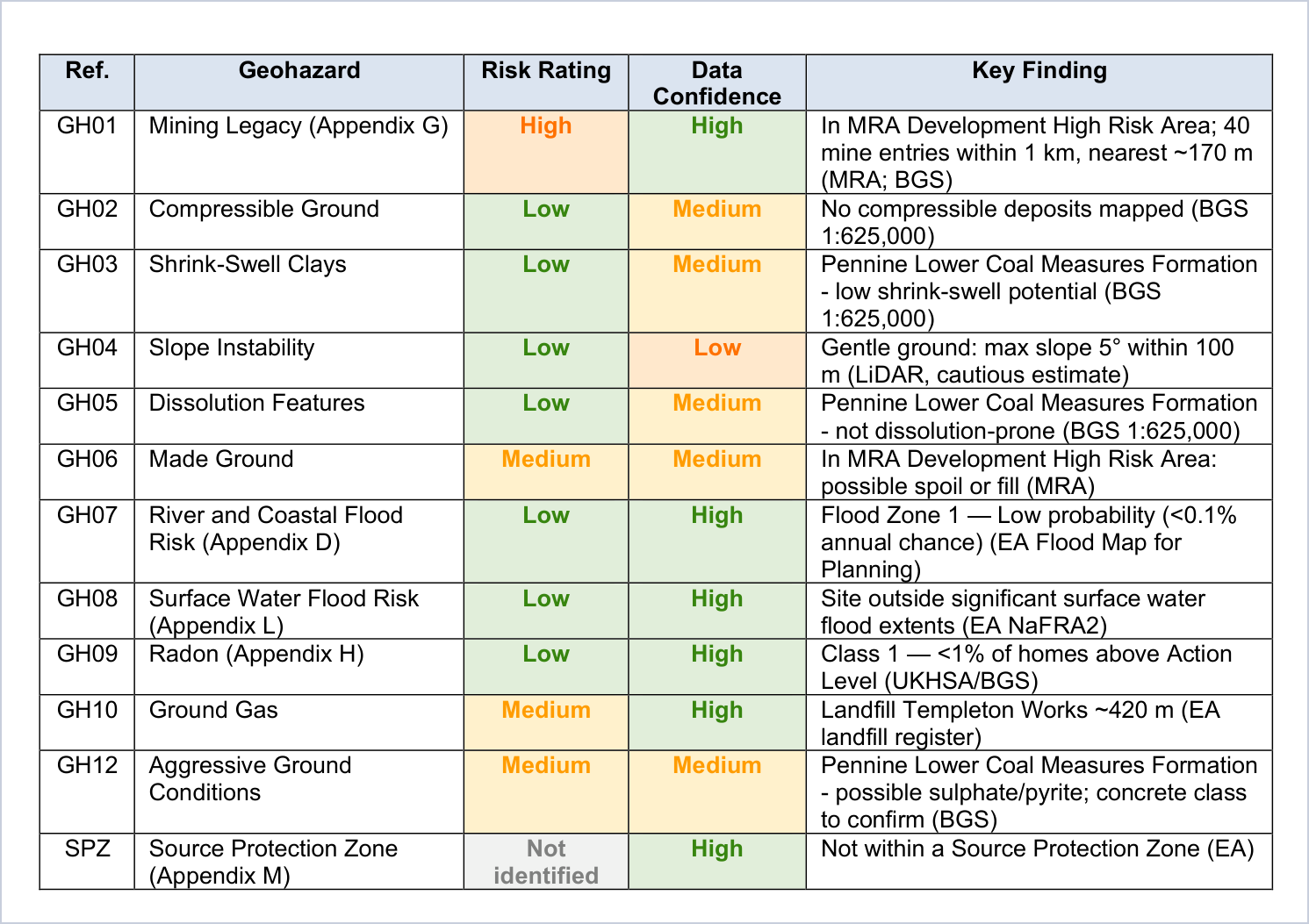
Tier 0 gets the same column. For a £75 snapshot that’s most of the value: you can see in one table not just that a site rates High, but what it’s High for.
Borehole records in Tier 0
The BGS borehole table used to be in Tier 1 only. It’s now in Tier 0 as well, and it’s the same table: the nearest records, with depth, year, grid reference and a link to the scanned log where BGS has one online. For a site boundary or a route, it lists every record within 100 metres of the site.
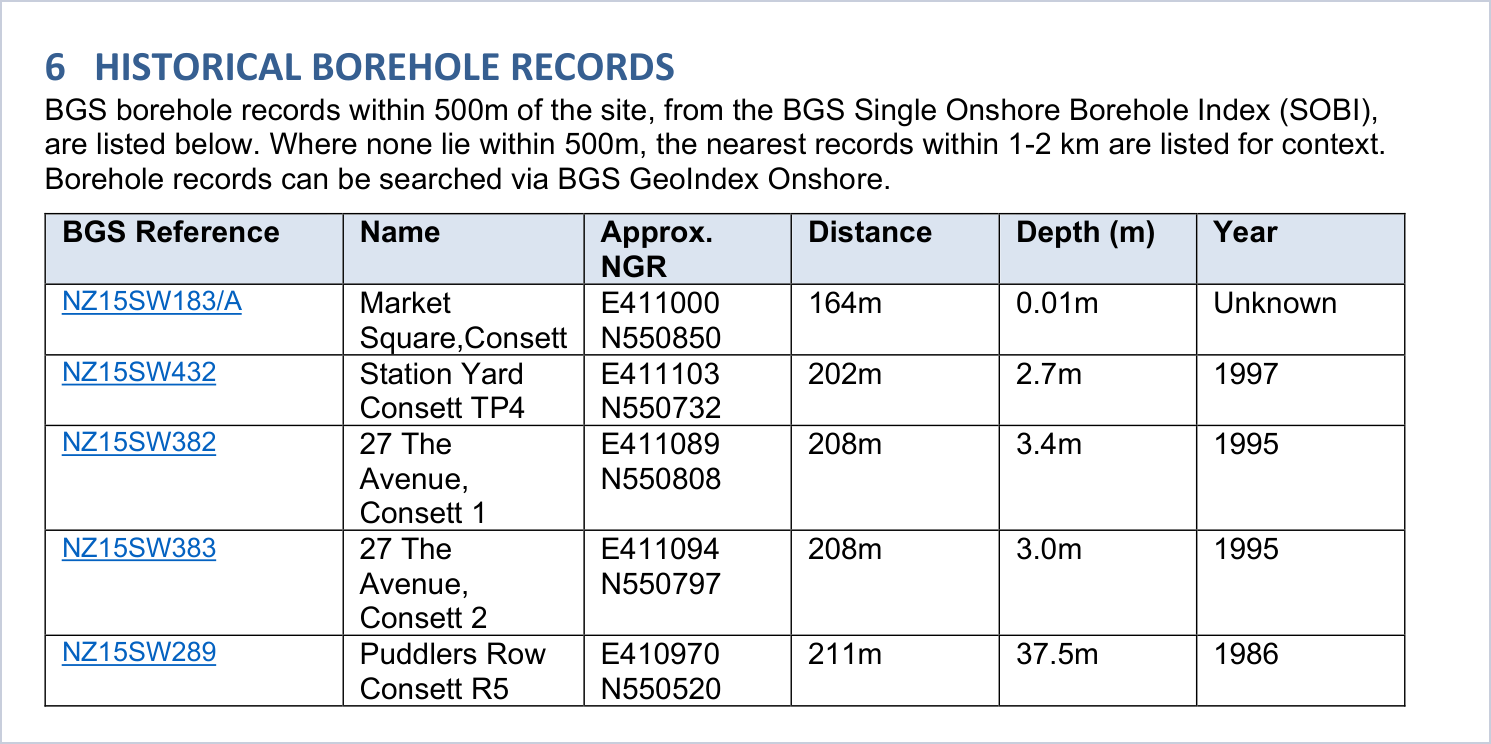
Where there are no records within 500 metres, which happens on rural sites, the search widens to 1 km and then 2 km, and the nearest three are listed for context, with a note saying how far away they are. A borehole 1.5 km away won’t tell you much about your site, but it tells you more than an empty table does.
Links to every BGS map covering the site
GeoScreen’s geology comes from the BGS 1:625,000 national mapping, which is the scale our current data licence covers. That’s fine for the broad picture, but it won’t show a fault running through the site, the edge of a deposit, or a mineral vein. BGS has published far more detailed maps over the years, and an engineer reviewing a site will usually want to look at them.
Finding them has always meant a trip through BGS’s map index, working out which sheet the site is on, then checking which editions exist. So the report now does that for you. It lists every BGS geological map that covers the site: the 1:50,000 sheets and their older one-inch editions, the 1:25,000 sheets where they exist, the 1:10,000 and six-inch sheets, and the County Series six-inch maps, some of which go back to the 1800s. Each one has its sheet, map type and year, and a link.
Where BGS has scanned the map, the link opens it on the BGS Maps Portal, where it’s free to view. Where it hasn’t, the link goes to the catalogue entry with the BGS record number, so you can order it. A test report for central Edinburgh listed 27 maps, from an 1859 edition to a 2006 one, and 22 of them could be opened online straight from the report.
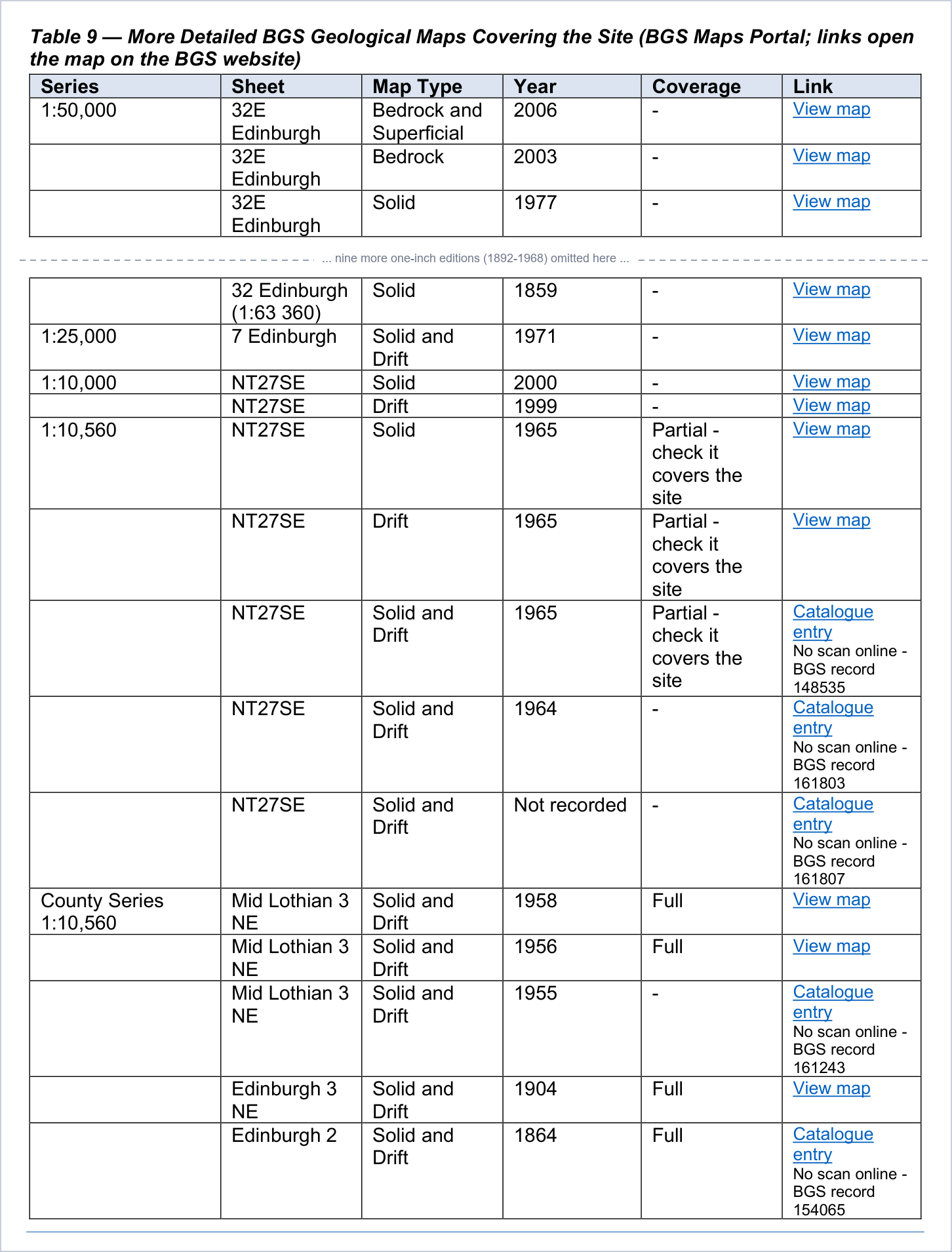
For a site boundary or a route, a sheet that covers only part of the site says which part, by chainage on a route or as a share of the site.
To be clear about what this is: these are links. GeoScreen doesn’t read these maps or use them in the assessment, and the report says so above the table. The ratings still come from the 1:625,000 data. The point is to save you the search when you want to go a level deeper. Coverage also varies, as it does in BGS’s own records. Some places have every series, and a few have only the 1:50,000 sheet.
Why these three
All three came from watching how people actually use the reports. The first thing a geotechnical engineer does with a desk study is check the geology map and the borehole records, and the first question anyone asks about a High rating is “High for what?”. The report should answer those without sending you somewhere else first.
Every report ordered from geoscreen.uk now includes all three, and the sample reports have been updated so you can see them for yourself. If you’d like to see one on a site you know, get in touch and I’ll run it for you.
